How Merlin works.
Three steps, and your people make every call. Merlin turns camera feeds nobody has time to watch into findings somebody actually reviews.
Your cameras
Merlin arrives as one small box we install on site. It connects to the cameras your site already has, however many that is. No new cameras, no rewiring, and you choose the days and hours Merlin watches.
Merlin watches and flags
Merlin watches each camera and flags what a safety lead would want to know about: a worker without a hard hat, mask or vest, a spill, a blocked exit, and the rest of the board on our home page. Every flag becomes a finding, with the picture behind it, so nobody has to take anything on faith.

Your team decides
Findings land in a review queue. A supervisor looks at each one, records what they saw, and signs off. The record stays, and it is yours.

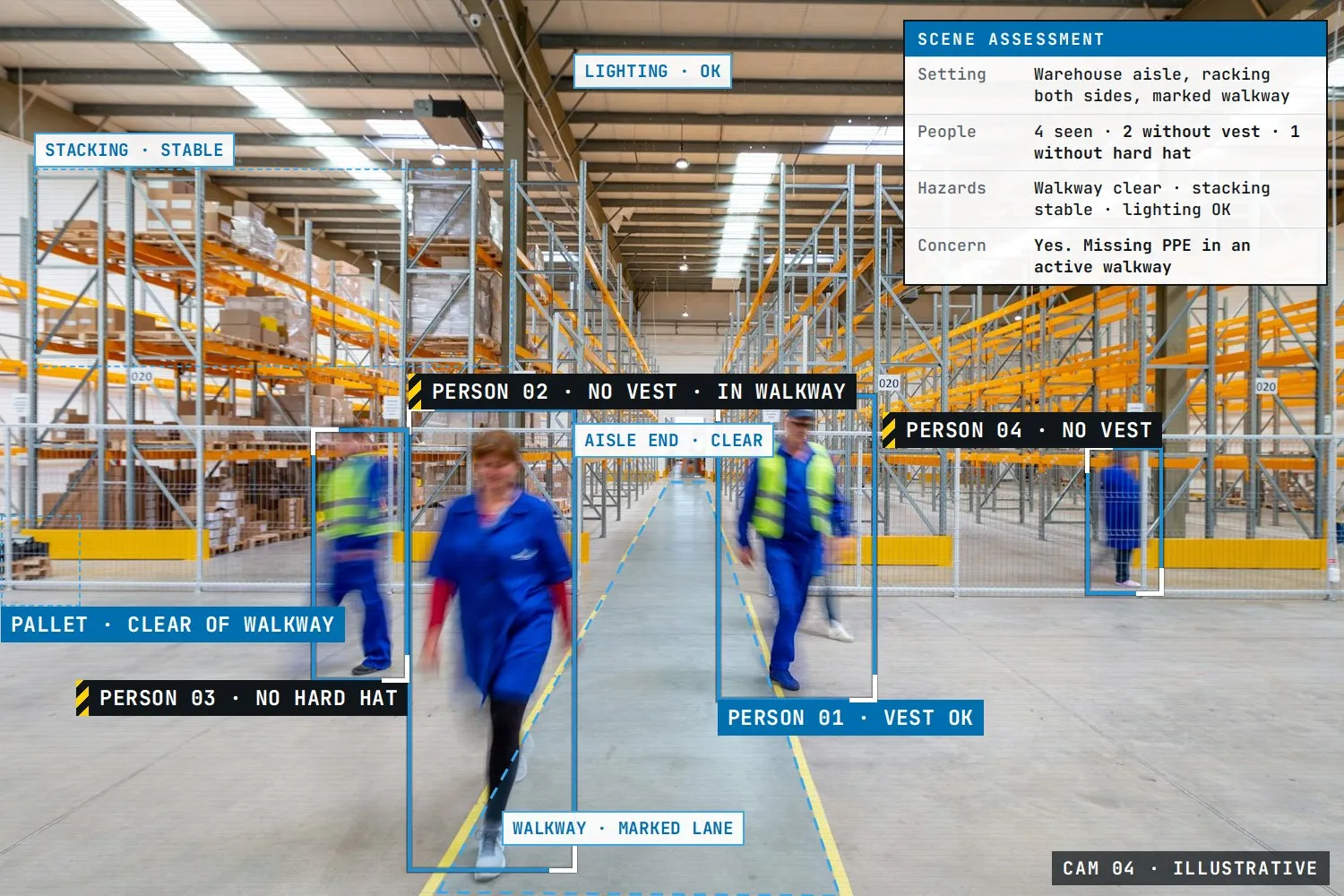
Merlin reads the whole scene, not just the objects in it: every person and their gear, what sits inside a marked walkway, whether stacking looks stable, whether the lighting is adequate. It then writes a short assessment of the scene, and that is what turns a camera frame into a finding a supervisor can act on.
You stay in control.
The schedule
Choose the days and hours Merlin watches. Outside them, it is quiet.
Who hears about what
Notification rules you write yourself: this camera, this kind of finding, this person. Email, in-app or webhook.
Approval gates
Multi-step workflows can pause until a person approves the next step, with an inbox for pending sign-offs.
Who can do what
Role-based access for admins, supervisors, operators and viewers, with a full audit log behind it.
One rule sits above all your settings. Fire, a person down and blocked exits always reach a person. Merlin can never dismiss those on its own. That floor is built in, not configured, and no setting can lower it.
See it on your floor.
Tell us about your site and your cameras. We will take it from there.